HAMMAD KIYANI

Saturday, 12 November 2016

How to create a app without any programming skills

There was a time when mobile application development was only for the elite programmer (i.e. people who knew the native platform language). With the dawn of hybrid mobile application technology, it was possible to create mobile applications using HTML, CSS and JavaScript. Hybrid application development made it possible for non-mobile developers to get their hands dirty with mobile app development.
But what about those people who don't have any prior programming knowledge? Can they make a mobile applications on their own? 

Is it possible to make any app without code ?

No. There are several web services which enable users to create simple mobile applications. As of now, you can't rely on these web applications to help create complex mobile applications. But they may surprise you in the future.
In this article, we'll look at some services which enable people with no prior programming knowledge to create simple mobile applications.

Appy Pie

To get started with Appy Pie, sign up for an account and sign in. Once signed in you should see a link to create a new app.
Creating an app using Appy Pie is a 3 step process:
  1. select a category
  2. build your app
  3. publish.
Start building an app by entering a name and selecting a category. Based on the category it will have some default splash and background images which you can change later.
Once on the second page, you have the options to add pages to your app, style your app and change the app navigation.
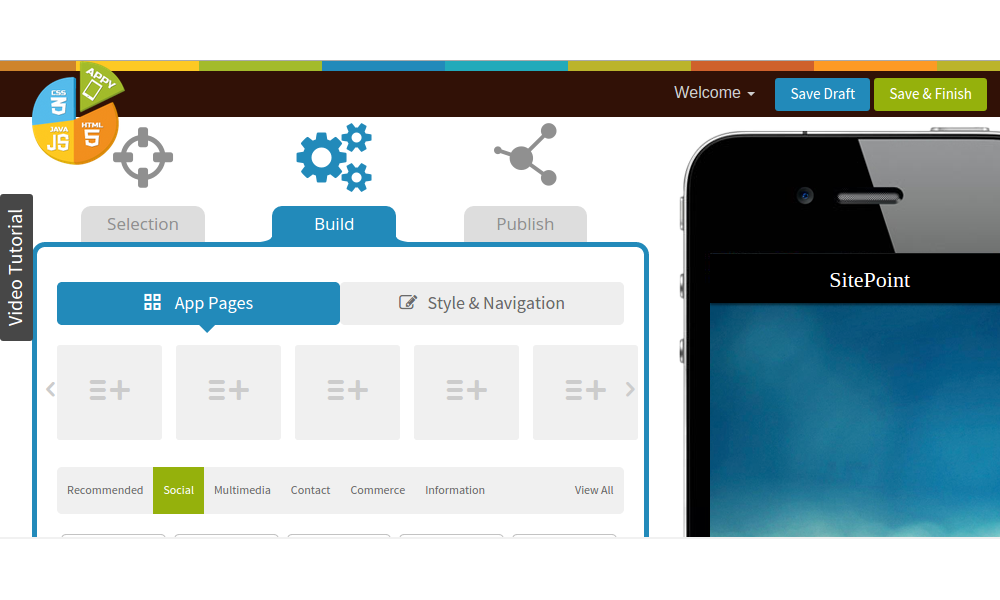
Appy Pie
You can add different pages to your mobile app by clicking on the icons listed below. To customize the look and feel of your app click on the Style & Navigation tab. Styling and navigation options are neatly placed under a single tab and hence accessible.
Once finished with modifying the style and navigation of your mobile app, click on the publish tab to proceed. Based on your subscription plan you should be able to publish to an app store or test the app on your mobile.
Based on your pricing plan you will be able to use Push Notifications, Ads etc. in your mobile apps. You'll need a developer account to publish to the Apple app store or Google play store.
On the Appy Pie market place you can preview mobile apps created using the service.

Nativ

To get started with Nativ, sign up for a free account.
You can start creating a mobile app by choosing a template for the app. After choosing the template you should be presented with a screen with two tabs, Designand Features.
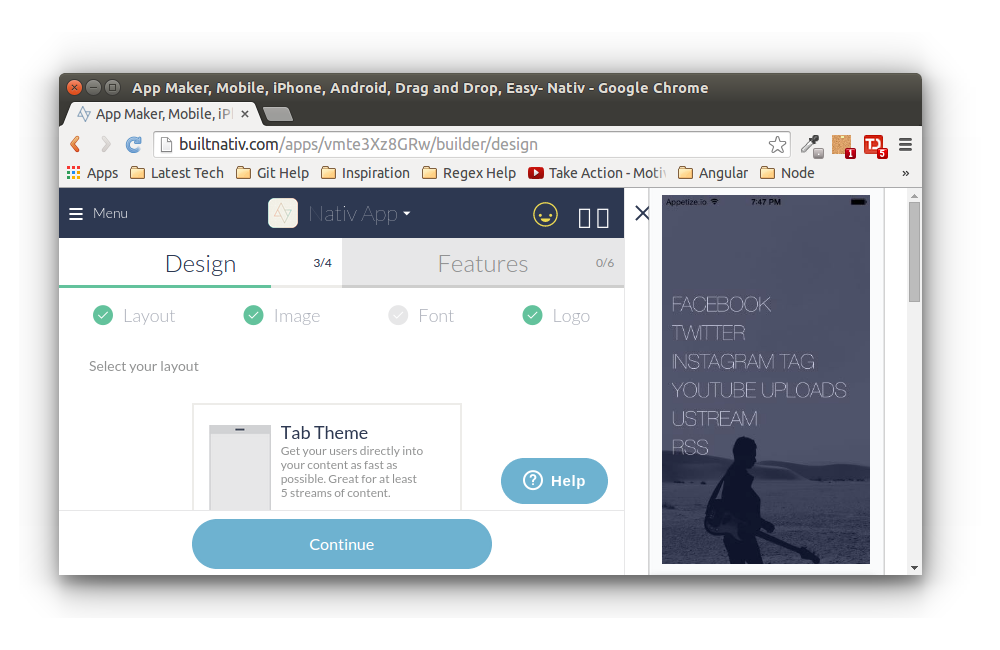
Nativ
Layout, background image, font and logo can be modified under the design tab. Under the features tab you can select from a list of different streams that can be added to your app. Nativ has streams like facebook, twitter, PDF reader etc. Some streams like WordPress and Chat should be available soon.
Once you have completed your app, you should be able to see a preview on the right side of the screen. When you are finished, click the finish the app button.
By default nativ publishes the app under their own developer account but you can also publish under yours. Push notification features are available only under paid plans.
More info can be found in their faq.

Kinetise

Although Kinetise is in beta, it's more appealing to me due to its look and feel. When you click on the create app button you are presented with an app preview in the middle of the page with customization options on the side which gives it a different feel (or so it seemed to me).
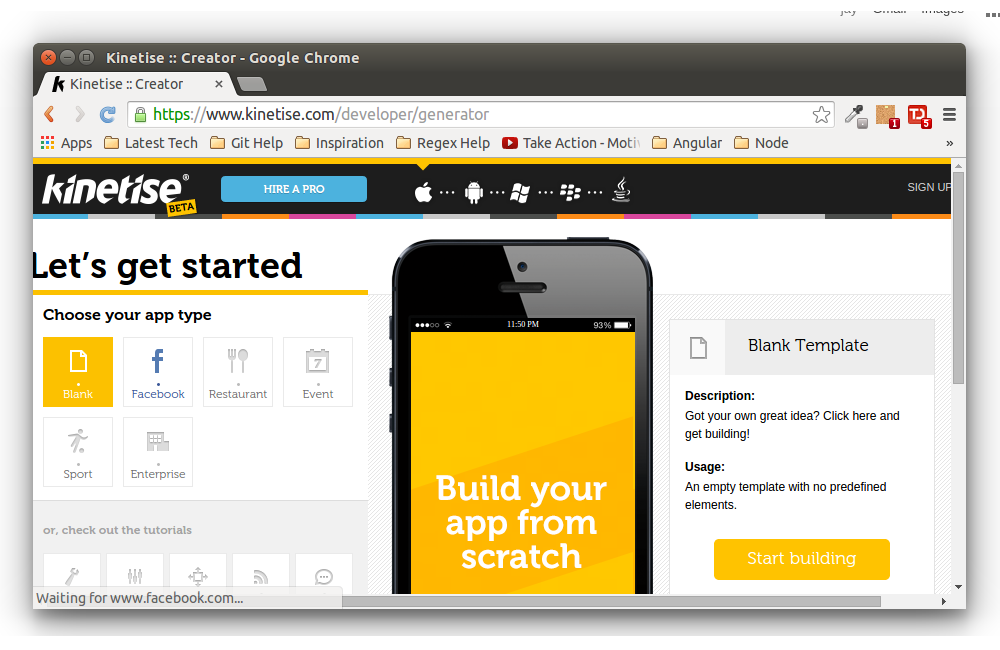
Kinetise
You can start by selecting any particular app type or begin with an blank template and clickStart Building. On the next screen, you can see Kinetise has the option to drag and drop widgets and controls onto the app. Widgets are displayed on the bottom of the page and can include text, images, video, gallery etc.
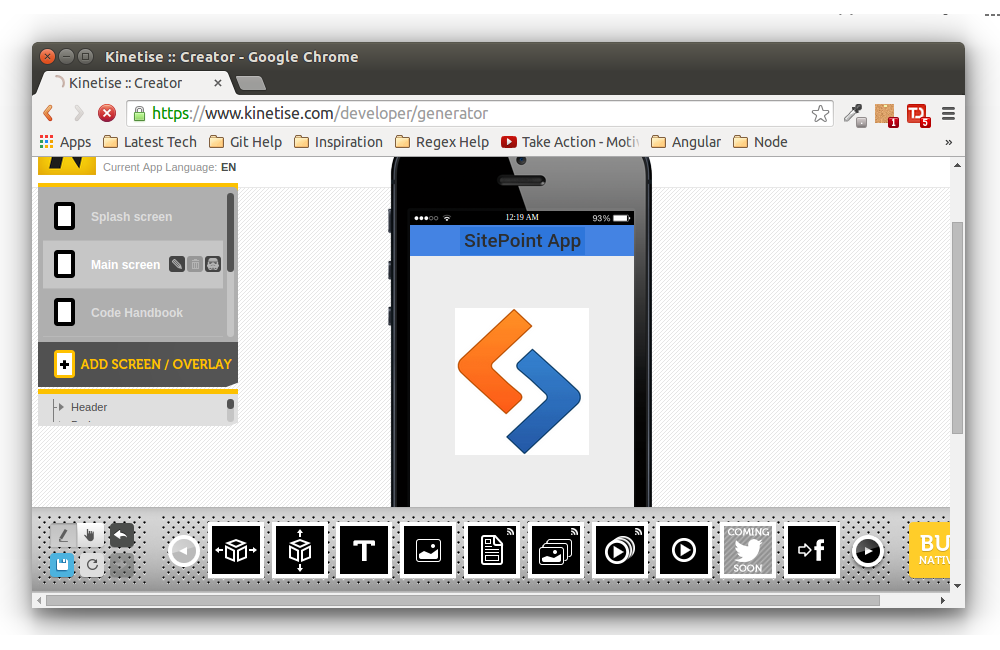
Dragging Widgets
On the left side of the screen you can see options to edit the splash screen, main screen and to add new screens. Once new screens have been added by clicking add screen on the left hand side, it's added to the bottom of the app.
To emulate the app, click in the preview screen and you need to right click on the preview screen.
At the top of the preview screen you can see options to view the app on different platforms. There is a button above the preview to change the app mode to portrait or landscape.
Once you are finished designing the app, click on the build native app button in the bottom right corner. After the build has finished you have a web preview or a build for your native platform.
Based on your pricing plan you can have features like push notification, publishing to app stores etc. In case you don't have a developer account for Android or Apple, Kinetise can publish the app using their own developer account for a small fee.
Here is a preview of an app created using Kinetise.

Conclusion

Do you have any experience with any of the app creation services above? Or any other services?
Did you face any issues while developing apps using them? I would welcome your thoughts

9 tips to prevent yourself from phising

Phishing scams are among the most prevalent forms of cybercrime, especially in the UK. Although phishing is widespread, it is beatable. Apart from ensuring you install security software, the best way to combat scams is to learn what phishing looks like.

What is Phishing?
Phishing (pronounced "fishing") is a kind of identity theft which is growing in popularity amongst hackers. By using fraudulent websites and false emails, perpetrators attempt to steal your personal data - most commonly passwords and credit card information.
Criminals gain this information by sending you links to sites that look like sites you trust, such as your online banking provider or social networks, and are able to steal your data as you enter it. Some of the sites spoofed most regularly include PayPal, eBay, Yahoo! and MSN, as well as financial institutions - so don't think that an email is guaranteed to be safe when it's not from a bank.
How to protect yourself against phishing

  1. Be wary of emails asking forconfidential information - especially information of a financial nature. Legitimate organisations will never request sensitive information via email, and most banks in the UK will tell you that they won't ask for your information unless you're the one contacting them.
  2. Don't get pressured into providing sensitive information. Phishers like to use scare tactics, and may threaten to disable an account or delay services until you update certain information. Be sure to contact the merchant directly to confirm the authenticity of their request.
  3. Make sure you familiarise yourself with a website'sprivacy policy. The majority of commercial websites have a privacy policy, which is usually accessible at the foot of the page. The most useful thing to look for is the website's policy on whether it will or will not sell its mailing list.
    Most of the spam you receive on a daily basis - as well as potentially dangerous phishing emails - is coming to you because a site you have signed up to has sold your email address to another company. If you're not ok with this happening, it might be worth reconsidering whether you want to sign up to the site.
  4. Watch out for generic-looking requests for information. Fraudulent emails are often not personalised, while authentic emails from your bank often reference an account you have with them. Many phishing emails begin with "Dear Sir/Madam", and some come from a bank with which you don't even have an account.

  5. Never use links in an email to connect to a website unless you are absolutely sure they are authentic. Instead, open a new browser window and
     type the URL directly into the address bar. Often a phishing website will look identical to the original - look at the address bar to make sure that this is the case.Never submit confidential information via formsembedded within email messages. Senders are often able to track all information entered.
  6. Make sure you maintain effective software to combat phishing. Norton™ Internet Security automatically detects and blocks fake websites. It also authenticates major banking and shopping sites

Top 10 apps to make money on android or ios

How much do you pay for apps on your iOS or Android device? Do you know that you can earn real cash and rewards from using certain apps? Granted that you will have to work for it by carrying out tasks like grocery shopping or checking out a new line of clothing, watching trailers, taking photos, and meeting new people. Sound interesting?
Then, you really should check out these10 apps that will earn you real cash and rewards (gift cards and redeemables). We’ve split the tasks from the rewards to help you figure out which app to try out first., but something tells us that you’d probably be checking all of them out. Some even help you to get in shape and to do your part for charity.

1. Field Agent

What to do: You turn into a field agent for some field work, carrying out small missions in your neighborhood. You’ll get instructions of what to do and where to go, places like your local shopping mall, grocery store, or any landmark. The jobs must be completed within 2 hours, and is on a first come, first served.
What you get: Each job is worth between $2 and $12 (paid via PayPal).
Platform: iOS
Field Agent

2. CheckPoints

What to do: You can earn points for checking in to a grocery store, cafe or shopping mall, scanning the items that you buy during these errands or even when you recommend a friend to join CheckPoints.
What you get: The earned points can then be redeemed for rewards like Amazon.com and Walmart gift cards, games, cool gadgets and more.
Platform: iOS | Android
CheckPoints

3. EasyShift

What to do: Complete simple assignments (Shifts) such as taking photos, giving an opinion, or recording the price of a product. After you complete several tasks, you will be promoted and will then be able to unlock higher-paying assignments and other valuable perks.
What you get: Payments will be made via PayPal and can be processed within 48 hours.
Platform: iOS
EasyShift

4. App Trailers

What to do: Preview trailers about apps and earn points while you’re at it. Help the app makers improve their app trailers by sharing honest opinions about what they need to add to complete the trailer.
What you get: You get paid half a cent for each video you watch. For trying out a demo (of an app), you can get paid between 9 cents to a dollar. Joining via a friend’s referral code may give you a head start of 50 points.
Platform: iOS | Android
App Trailers

5. Iconzoomer

What to do: Take photos of what is asked in your assignment: your lunch, your drink, or the shoes you are wearing, and earn money for each snap. Share a comment about the snapshot (if you got a feedback you want the manufacturer the know, this is your chance), and that’s it.
What you get: Earn money for each completed assignment via PayPal or get free merchandize. There is also the option to donate to charity via Unicef.
Platform: iOS | Android

Iconzoomer

6. GymPact

What to do: Exercise at the gym and earn money. Seriously! Once you’ve made a week-long pact on GymPact, you get paid for every day you go, and you have to pay for every day you skip. Those who get to the gym to exercise get to claim their monies from those who didn’t!
What you get: You’re getting $0.50 to $0.75 per workout which must lasts a minimum of 30 minutes. And you get to follow your exercise regime, and keep fit and healthy.
Platform: iOS
GymPact

7. Gigwalk

What to do: Be a Gigwalker and run special assignments for clients at a preset price. You could be asked to take photos of a place, hand out fliers, check out a new bistro or a new product, or even become a mystery shopper. You essentially become your clients’ eyes and ears simply by being at the right place and the right time.
What you get: Get paid from $10 to $15 an hour.
Platform: iOS
Gigwalk

8. Shopkick

What to do: If you are a heavy shopper and love trends and bargains, earn ‘kicks’ just by being yourself with Shopkick. Find participating shopping places that allow you to earn kicks with every walk-in and/or purchase and you will be able to redeem rewards with the ‘kicks’.
What you get: You get a first look at items at the store (while earning extra ‘kicks’) even before an actual walk-in. Use your ‘kicks’ to unlock gift cards and products you can redeem.
Platform: iOS | Android
shopkick

9. ESPN Streak For The Cash

What to do: Think you know your sports team? Then name your predictions for each game and make sure you get the longest winning streak of the month. To make it tougher, you have to make the call for 10 different sports and maintain your streak.
What you get: The longest winning streak for a team or a player will win a monthly grand prize of $50,000.
Platform: iOS | Android

10. Phewtick

What to do: Get Phewtick on your phone, meet up with someone, scan a QR Code and voila, get paid just for meeting people.
What you get: Earn points that you can cash out, or donate to Unicef or the Red Cross. And meeting new people for work or leisure.
Platform: iOS | Android
Phewtick

More Apps!

Here are 7 more apps where you can earn money just by answering surveys, watching videos, downloading free apps among others.
Cash King: You earn money for downloading and trying out free apps (including new games), watching videos or completing surveys. Get paid via PayPal or receive Amazon.com gift cards in return.
Platform: Android
Cash King
Get Paid to Play!: Watch some video ads, download and play some new games, and register on websites to get paid. You can withdraw your payment from PayPal.
Platform: Android
Get Paid to Play!
NPolls: Share your opinions by answering polls. Topics may cover politics, sports, social trends, lifestyle, brands and more. You are paid usually around 20 cents per survey.
Platform: iOS | Android
NPolls
Mobile Rewards: Sign up for a free service, watch a Youtube video, or mention a product on your Facebook Wall. Earn credits that can be redeemed in cash via PayPal. Use a referral link and you can earn 100 credits for every friend who signs up, plus 10% of their earnings.
Platform: iOS
Mobile Rewards
JunoWallet: Play games, watch videos, complete surveys and invite tons of your friends to join JunoWallet. A variety of rewards via Invites (3 levels) which can come as giftcards for games, pizza, coffee, movie tickets and more.
Platform: iOS | Android
Earn Money: Download free or paid apps, register to free or paid websites, or watch ads to earn points that can be accumulated and turned into cash. Payment is done via PayPal.
Platform: Android
Earn Money
Thumbspeak: Answer questions in polls and surveys and get paid for your opinion. Get paid via PayPal or cash in on gift cards.

Thursday, 10 November 2016

5 legitimate ways to earn money online

Websites That Pay

Let’s go ahead and get this out of the way. There are all kinds of websites that will pay you for various things, such as shopping, taking surveys or testing products. No, I’m not getting paid to promote any of these and no, these websites won’t make you a millionaire, but they are great for earning some extra cash. I’ll leave out the scams.
Here are some legitimate websites that pay:
  1. Swagbucks – Swagbucks is great for earning some extra cash. You can do a variety of things to make money, from taking surveys to using their search engine. You won’t get rich, but you will earn a few bucks. If you have the time to kill, you can spend it earning some extra cash, instead of surfing the web.
  2. InboxDollars – InboxDollars is similar to Swagbucks, since you’re going to be taking surveys, shopping, etc., so if you want to maximize your return, sign up with both websites. They also offer a search engine that pays you (like Swagbucks) and you get $5 just for signing up.  I won’t continue to list survey sites one after another down the list, but if you want to get paid to take surveys, also check out GlobalTestMarketE-Poll Surveysand Survey Club.
  3. Project Payday – Project Payday is one of those sites that has testimonials of people who have earned thousands of dollars by getting paid to get trial offers. I’m not saying you’ll earn thousands, but it is legit and you can earn some extra cash. They assume that by paying you to do a free trial, you’ll either like the product and purchase it, or forget to cancel the trial and get charged for it. If you can keep track and cancel before you get charged (if you don’t want the product), then this is a great site for making some money.
  4. User Testing – User Testing pays $10 a pop for testing websites. A test usually takes about 15-20 minutes. The purpose is for a website owner to watch someone, who is new to their site, try to navigate it. The value that the site owner gets by watching an actual user experience is worth a ton, but $10 isn’t a bad pay-out.
  5. Fiverr – Fiverr is a great place to make a few bucks or spend a few bucks if you need some of the services people offer. Basically, everything is $5. You either pay $5 or charge $5. They call them “gigs.” You can offer your services however you choose. If you sell art and you’re fine selling pieces for $5 each, that’s a gig. If you’re a graphic designer and you want to offer your services for $10/hour, simply offer a 30 minute gig. If they need two hours of graphic design, they pay you $20, or $10/hour by buying four gigs.
  6. IZEA – IZEA works in addition to a blog or on its own. You get paid to blog, tweet, take photos and take videos. The pay is mostly based on your following, so if you want to make money with your tweets, you’ll need to grow you Twitter following.  Likewise, if you want to make money with blogs, you’ll need substantial blog traffic (more on blogging below).

2. Freelance Writing

Freelance writing is one of the most popular ways to earn money online. Many successful freelancers can earn an average of 50 cents to a dollar per word. Some are earning twice that!
Of course, it doesn’t start out like that. You’ve got to build your portfolio and your résumé, blah blah blah. If you’re interested in writing, I’m sure you know this. If you’re not interested in writing, I wouldn’t recommend traveling down this road just for the money.
It takes dedication and time, though it can be highly profitable if it’s what you love. Assuming it is what you love, let’s talk about making money with it.
Before you decide to start reaching out to all of these freelance writing companies, you need to have a web presence. You need a blog (in my humble blogger opinion, of course).
Or you could just have an online portfolio. Even a LinkedIn profile works to get started. When you’re ready to start, here are 150 resources to help you write better, faster and more persuasively.
If that’s intimidating, just start with these 50 resources.
Now for what you’ve all been waiting for; once you’re ready to actually start making money, here are 10 websites you can start with:
  1. Listverse – Listverse pays $100 for each accepted post. The article must be a list, it must be at least 1,500 words and you must include at least 10 things. Other than that, you can get pretty creative with it.
  2. TopTenz – TopTenz pays $50 for each accepted post. Again, the article has to be in a list format and it must be at least 1,500 words, with few exceptions. They post often so your chances of getting accepted are fairly high.
  3. A List Apart – A List Apart pays $200 for each accepted post. They’re not first on the list, because they tend to publish less articles, which means you have a smaller chance of getting accepted. Same guidelines as above, 1,500 word minimum.
  4. International Living – International Living pays $75 for each accepted post. They are mostly looking for travel experiences from countries you have visited. For this site, it’s more about your experience than your writing ability.
  5. FundsforWriters – FundsforWriters pays $50 for each accepted post. They are looking for articles about writing and making money with it. They only accept articles between 500-600 words, but they want you to make each word count.
  6. Uxbooth – Uxbooth pays $100 for each accepted post. They do tend to take four to eight weeks to accept and post articles, so don’t count on this being a quick money maker. They take so long, because they pair with editors to only publish amazing content.
  7. iWriter – iWriter pays up to $15 for each accepted post. That may seem small, but they aren’t as strict as many of the others above and they also allow you to pick exactly what you write. You can write as many or as few articles as you want.
  8. Textbroker – Textbroker pays up to five cents per word, if you’re a 5-star writer. You’ll start by submitting a short sample article and you will most likely start as a 3-star writer, but you can work your way up by writing more and writing great content.
  9. Matador Network – Matador Network pays up to $60 for each accepted post, but standard pay is around $20-$25. They don’t really focus on a minimum word count, but they have a maximum count of 1,500 words.
  10. The Penny Hoarder – The Penny Hoarder pays up to $800 (rarely), depending upon the number of page views you receive. The pay starts at $100 for 50,000 page views, so this isn’t a guaranteed paid article, but it can potentially be highly rewarding.
There’s no doubt that you can make money with freelance writing, but it’s a process. Once you start building your portfolio and your writing skills, you can start making some serious money. If you’re not an experienced writer, expect to put some time in before you really start to see some dough.

3. Sell Your Stuff

Ever since the idea of online auctions came into existence, the online selling market has been on the rise. Many are interested, but don’t know how to get started. There are still all kinds of ways to make money by selling online, whether you’re selling what you already have or buying and selling like a store. Before we get started, here are a few general tips when selling anything online:
  • Get a PayPal account. If you don’t have a PayPal account, you’ll want to get one if you’re doing business online. It’s the standard in online business for receiving payment and paying others.
  • Take good pictures. Some of the options below don’t require you to actually take the picture and sell the product, but for the ones that do, make sure you take a clear picture that makes your product stand out from the others.  If you’re going to be taking a lot of pictures, set up a small “studio-like” area in your home with a backdrop and proper lighting to really make your pictures come across as professional. And of course, you’ll want a good camera too.
  • Be honest.  If you’re selling used items, be honest about every dent, scratch, blemish, etc.. This will reduce many issues you could run into and keep your reviews positive.
  • Do good business. Plain and simple. Whether you’re selling on a small site or opening an online store, your customer service matters. You’ll want to get those positive reviews and make a good name for yourself. Respond to questions, concerns and complaints. Offer a guarantee if available.
Follow those guidelines and you will do well in online sales. When you’re ready to start selling, here’s where you go:
  1. Amazon – Have you heard of FBA? It stands for “Fulfilled by Amazon” and it’s getting pretty popular. Basically, you buy products (in bulk is best) and ship them to Amazon for them to store. When your products sell, Amazon packs them up, ships them out and sends you the money (after taking their cut). There are people making a full-time living from FBA, while others just do it for some extra money.
  2. CraigsList – Some things don’t ship very well. Other things may make you feel uncomfortable to sell to someone across the country. Anytime you’re selling a large item or something you just don’t want to ship, Craigslist is a great place to go. It’s simple to list your item (again, take good pictures!). If you don’t like the idea of putting your phone number out there, the interested individual can send you a message to your inbox without even getting your email address.
  3. eBay – Of course you can’t read an article about making money online that doesn’t mention eBay. You can start an eBay store and get serious about it or you can just sell some stuff to declutter your home. Either way, I’ve made my fair share from selling on eBay and it’s still a popular way to earn money. If you decide to start an actual eBay store, you’ll want to find a drop-ship business like Doba that will store and ship items straight to your customers so you don’t have to deal with an inventory.
  4. Etsy – If you like to create arts and crafts, you can sell them on Etsy.It’scompletely free to open an Etsy store. You simply sign up, post pictures of your creations and starting selling. You can choose your payment option, but PayPal is generally the easiest. Etsy makes it easy to sell and keep track of your inventory. There is a small listing fee and they take 3.5% of every sale you make.
  5. Facebook – Facebook swap shops are great for selling things locally. It’s like CraigsList, but a little easier. You simply search for swap shops in your area and ask to join the group. Once you’re in, take a picture of the item, write a quick description with the price and post it. It doesn’t get much easier than that. You can generally expect to get about what you would get at a yard sale, maybe a little mo
  6. 4. Blogging

    Hey look, an article about making money online that doesn’t mention blogging. . . oh wait, here it is.
    First off, I’m a blogger so it seems wrong not to mention it, but more importantly, it’s a legitimate way to make money. It’s quite possibly the least straight-forward way on this list, but it’s very doable and it’s also quite possibly the funnest way on this list. I love blogging and I know hundreds of bloggers who feel the same. So let’s talk about making money blogging and what it really means.
    Blogging is something that requires patience, persistence and discipline. It may mean writing everyday for over a year before you really start to see any money from it. There are exceptions to the rule, but from my dealings with other bloggers, it seems to be pretty common to spend one or even two years building your blog, your brand and your authority, before making any serious amount of money.
    Some people argue that you can make money without a lot of traffic and while that is true in some circumstances, you will generally need a lot of website traffic to start earning from a blog and that takes a while. Once you’ve reached that point, here are the primary ways to monetize your blog and start earning:
    1. Advertising – This is definitely the most old-school way of earning money with a blog. It’s also starting to become the least common way. You can sell advertising spots directly on your site or you can sign up with a company like Google AdSense orMedia.net. Either way, you won’t see a whole lot of money from ads until your views are well into the thousands each day.
    2. Affiliates – There are many affiliate networks, such as FlexOffers and CJ Affiliate that allow you to promote other people’s products and services. You simply put a link or a banner on your page and then you get a percentage if someone clicks through and buys the product/service. You’ll want to select products that are specifically within your blog’scategory.This is an effective way to earn money once you have the traffic coming to your blog.
    3. Membership – Many people have created a paid membership area on their blog. This is typically for exclusive content that you can only access in the “member’s area.” If you have a really great idea on what to include, this can be a great idea.  You’ll have to create something that can’t easily be accessed around the web.
    4. Products – You can create your own product, such as an ebook or computer software. You would then use your blog as a promotion tool to get people to buy your product. As long as you create a legitimate product with a whole lot of value, you should be able to get some buyers, but like everything else with a blog, you’ll need the traffic to get the sells.
    5. Services – You can offer a paid service, such as life coaching, blog coaching, goal setting or financial planning. Just be sure to investigate all the legal implications and make sure you’re not claiming to be a professional if you’re not one. With a service like this, you’re basically using your blog to sell yourself. You’ll need to convince people that you’re worth buying and then be able to back up your claims once they purchase your service.
    6. Sponsored/paid posts – Many blogs publish sponsored and paid posts. Sponsored posts are basically just posts about a specific brand, product or service. A company will pay you to publish an article about it. It’s similar with other paid posts as well. Your basically selling the spot for the article on your site. If you decide to take this route, you’ll want to build your traffic before you will get many offers.
    7. Subscription – If you think of something valuable (newsletter, online magazine, etc.) that you can consistently offer on a certain basis (weekly, monthly, etc.), you may want to offer a subscription service. This could be a fee charged each time your product is sent out or on a monthly basis. Either way, this has to be something that your customers can only get by subscribing to your website.
    8. Videos – This could be an entire section on it’s own. Many people have made money by creating YouTube videos. Evan of EvanTube is a kid andhe has made millions by creating reviews of products that other kids his age would use. It’s not easy to get views into the millions, but once you do, you’ll start seeing some cash come in. Many bloggers have completely turned to videos to get their point across by starting a video blog.
    If you’re truly interested in becoming a blogger, start by looking through the archives of ProBloggerCopyblogger andBoost Blog Traffic. Then go read through all the free guides over at Quick Sprout. It may take you a year to complete those tasks alone, but it will be worth it. You’ll practically have a MBA in blogging.

    5. Work-at-Home Companies

    Finally, there are some companies that will hire you to work from the comfort of your own home. If you’re interested in working for someone else, while still making your own schedule and deciding where to work from, here are a few companies that will let you do just that:
    1. CrowdSource – CrowdSource offers many types of jobs from “microtask” jobs to larger writing and editing jobs. You decide how much you work and you can do most of it right at your computer.
    2. Demand Studios – Demand Studios is hiring all kinds of creative professionals, from writer to filmmakers. The pay isn’t amazing, but it’s competitive for a work-at-home job.
    3. Fast Chart – Fast Chart allows you to work from home as a medical transcriptionist. There are some requirments and qualifications listed on the page, but if you meet them, you’ll make competitive pay for the industry. You’ll also be able to set your own schedule since you’ll be working from home.
    4. Leap Force – Leap Force is one way that Google rates websites for search engine ranking. If you’re hired, you make decent money (usually over $11/hour), you set your own schedule and it can be pretty fun to view and rank websites.
    5. Liveops – Liveops is a call center that allows you to work from home. Once your set up to take the calls, you can begin making a weekly schedule and working from home. The pay is generally close to $10/hour, but you can earn more with commissions.
    6. SpeakWrite – SpeakWrite will pay you up to $15/hour to transcribe information. You set your own schedule and work from home.
    Now you’ve got many different options to start earning online. If you saw something that really interests you, try it out and learn more about it. If you’re really wanting to make a full-time income online, you need to be dedicated to learning how to do what you want to do. There are tons of free resources out there. You just have to search for them!